Web search & Advanced thinking
Written By Paolo Rufrano
Last updated About 2 months ago
Two options change how a model answers. Both live behind the sliders icon in the chat box. Hover it and you'll see More options.
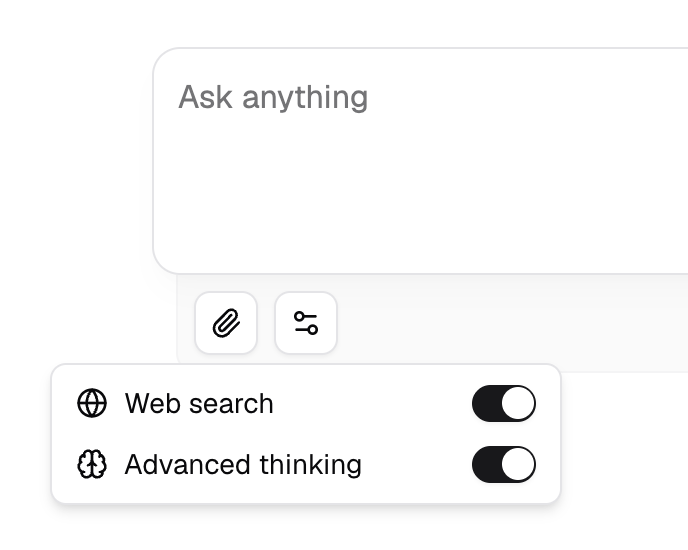
Advanced thinking
Turning on Advanced thinking gives the model time to work through a problem before it starts writing. It helps most with multi-step reasoning: maths, debugging, planning, anything where the first instinct is often wrong.
The trade-off is time and cost. Thinking produces extra tokens that you don't see in the final answer but that still count towards what the response costs.
When it's on, replies open with a collapsible block showing the model's reasoning and how long it took. Click to expand or collapse it.
The switch only appears on models that support it. If you don't see Advanced thinking in the menu, the model you've selected can't do it, so pick one with the brain icon. You can filter for these in the model picker under Capabilities → Advanced thinking.
Web search
Turning on Web search lets the model look things up before answering. Use it for anything recent, such as news, prices, release notes or documentation that changes, or when you want the model to cite where a claim came from.
After a search-backed reply you'll see a Sources heading with small pills, each showing a site's favicon. Hover one to see the page title, domain and a short extract; click to open the page.
Web search works on every model, whether or not it supports thinking.
What each costs
Both draw from your credit balance:
Advanced thinking costs whatever the extra reasoning tokens cost on that model. On a Free model it costs nothing, because that model costs nothing to run.
Web search is billed per search, separately from the model. This applies even on free models.
That difference matters when your balance hits zero:
If you try either with an empty balance you'll see:
You are out of credits, so thinking and web search are paused. Plain chat on efficient models is still available, or you can top up now.
Turn both switches off and plain chat on free models keeps running. See What happens when you run out of credits.
When to use which
Neither. Most questions. Fast and cheap.
Thinking only. Hard problems where the answer is derivable from what the model already knows.
Search only. Current facts, specific sources, anything you want to verify.
Both. Research questions that need current facts and careful reasoning. Slowest and most expensive.